November Product Updates
Created by Claire Walker, Modified on Tue, 24 Nov at 3:37 PM by Claire Walker
Check Point AI Security Report 2026
Check Point Research has released its second annual AI Security Report, examining how AI is reshaping both the attack landscape and enterprise risk. Key findings include:
- AI has moved beyond assisting attackers into directly running parts of the attack chain, with exploitation workflows increasingly automated
- High-risk generative AI prompts doubled over the past year; the average organisation runs ten AI applications a month, many without formal approval
- Credential theft targeting AI platforms ("LLMjacking") is a growing threat, with stolen AI account logins traded as a commodity
- Prompt injection attacks — hiding malicious instructions in content an AI reads, such as emails or web pages — rose sharply, with detections of long malicious payloads up roughly fivefold between March and May 2026
- AI is shortening the window between vulnerability disclosure and active exploitation, increasing pressure on patch timelines
- Generative AI can now convincingly fake voices, faces, documents and live video, undermining traditional identity verification
Access the full report here.
New SAT Module: IoT Device Security
A new Security Awareness Training module on IoT Device Security is now available. The module covers the risks posed by everyday connected devices — printers, smart displays, cameras and smart TVs — and teaches employees practical steps to reduce exposure.
Topics covered include:
- What connected devices can reveal (network details, account information, location patterns)
- How to replace default passwords and keep devices updated
- Reviewing privacy settings and disabling unnecessary features
- When to consult IT and how to recognise and report unexpected device behaviour
Granular Mailbox Retention for Email Archiving
Administrators can now set different retention periods for individual mailboxes, while keeping a default period across the rest of the organisation. This helps align archiving with specific compliance, legal or operational requirements.
For example, an organisation could retain most emails for 7 years, the legal mailbox for 10 years, and automated notifications for 2 years.
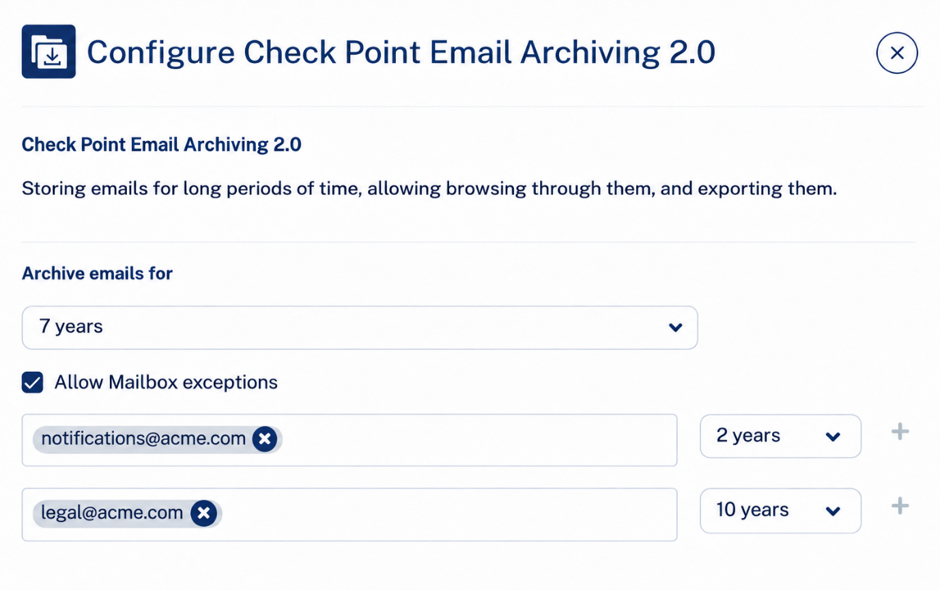
To configure exceptions:
Browser Security — Prisma Browser for Business, Built Into Guardz
Guardz Elite plans now include Palo Alto Networks Prisma Browser for Business, managed directly from the Guardz console. Licensing, deployment, seat sync and billing all run within Guardz... one account, one bill, one support path across all clients.
Two deployment options:
- Browser extension — for Chromium browsers (Chrome, Edge, Brave) on Windows and macOS; no MDM required
- Standalone Prisma Browser — for Windows, macOS and Linux; required for Safari, Firefox or where protection should not depend on the browser in use
Key protections (active from the moment of deployment):
- Malicious site and phishing page blocking
- File scanning and malicious extension blocking
- Web filtering by category or site
- Data controls (copy, paste, upload, download restrictions by site or category)
- Detection for PCI, PHI and PII moving through the browser
Additional features:
- AI Usage report — per-client view of AI tool access and policy posture; prompt content is never collected
- Browser signals in incidents — browser activity is attached to related email, identity and endpoint activity in a single incident
- Events page — dedicated view of critical, blocked and AI-usage browser events (hidden until a client has events to show)
Where to find it:
Advanced Reporting — AI-Powered Agentic Reports
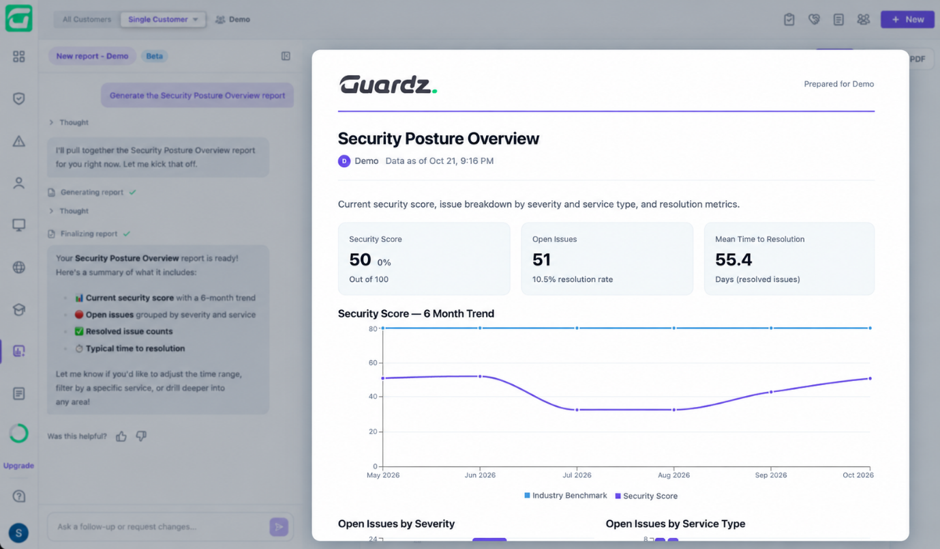
Guardz now includes agentic reporting, allowing you to generate branded, customer-ready security reports from 14 predefined templates. Once generated, you can ask the AI questions about the findings, save the report to revisit later, or download it as a PDF to share with the customer.
Available templates include:
- Monthly security summary
- Security posture overview
- MFA and administrator access audit
- Security awareness training results
- SMB1001
Reports include your MSP logo if one is configured. Unsaved reports cannot be reopened after you leave the page.
Microsoft Retiring EWS — Action May Be Required for Public Folder Backup
Microsoft is deprecating Exchange Web Services (EWS), the API that NinjaOne uses to back up public folder data. Core email and Exchange backup functions have already migrated to the Microsoft Graph API and are unaffected. Public folder backup is the remaining feature that depends on EWS.
Key dates:
- 1 October 2026 — Microsoft deactivated EWS by default. To continue public folder backups, re-enable EWS in the Microsoft admin centre and ensure NinjaOne's Microsoft app is on the EWS allow list (this happens automatically for most customers)
- 1 April 2027 — Microsoft fully retires EWS. No new public folder backups will be created after this date; existing backed-up data remains accessible
Australian Cloud Pricing Down 4% from 1 January 2027
As part of its annual exchange rate parity check, Microsoft has announced a reduction (likely 4%) in commercial cloud prices in Australian dollars, effective 1 January 2027. Individual product prices may vary slightly due to rounding. On-premises software prices in AUD are not changing.
Microsoft's notice did not specify when existing annual subscriptions move to the new prices.
M365 Outage — SLA Credit Claims
Some customers may be eligible for a service credit following last month's Microsoft 365 outage. Under Microsoft's Online Services SLA, credits are available where a service's monthly uptime fell below 99.9%.
Manage Protect can lodge eligible claims on your behalf. Email sla@manageprotect.com with the following for each affected customer:
- Microsoft incident ID(s)— confirm in Service Health in the Microsoft 365 admin centre:
- EX1550543 — Exchange Online
- MO1550821 — Microsoft 365
- TM1550488 — Microsoft Teams (a separate earlier incident)
- The customer's tenant ID (GUID)
- An email from the customer requesting the credit (must be from the affected tenant's domain)
- The downtime window, number of affected users and their location, and a brief note on steps taken.
- You can USE THE EMAIL TEMPLATE HERE
Power Apps Premium Price Increase — 1 January 2027
The list price of the Power Apps Premium SKU will increase by 10%, from USD $20 to $22 per user/month, from 1 January 2027. Existing subscriptions retain their current price until the end of their subscription term. Not-for-profit and education pricing will be adjusted in line with commercial pricing.
Copilot SKU Update
As previously communicated, from 1 December 2026 new Microsoft 365 Copilot SKUs without a base-subscription prerequisite will be available, priced the same as current SKUs.
Existing Copilot and Copilot Business SKUs that require a base subscription have been renamed to include "(add-on)" from 16 October 2026 and will reach end of sale in CSP on 1 December 2026. Existing customers can continue to renew and adjust seat quantities.
It also looks like Microsoft has pushed back the pay-as-you-go default for new Copilot Business reseller orders to Q3 (January to March) 2027.
Switch to the New Version of Octiga
A new version of Octiga is now available, built to help MSPs operationalise Microsoft 365 security across every customer more efficiently. The new version brings:
- Faster, more intuitive multi-tenant workflows
- Investigation and remediation directly in context
- New Baseline Schemes for scalable, consistent security management
- More granular tenant and user-level security controls
- A modern workspace designed to help engineers move faster
Switching moves your whole organisation — all users will be signed in to the new version, and the classic version will stop serving your organisation until you switch back.
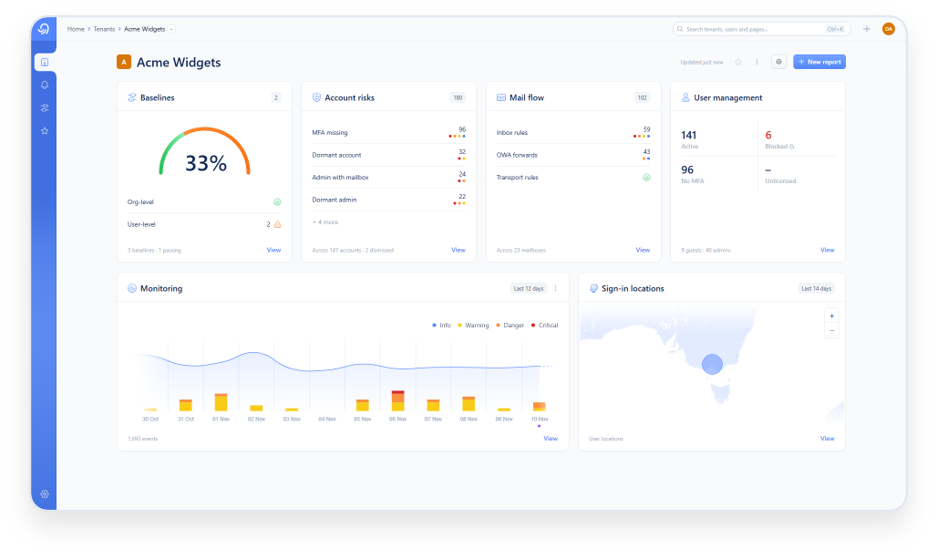
What to expect when switching:
- The switch takes approximately 6 minutes; neither version is available during this time
- Tenants, baselines, alerts, integrations and report schedules all carry over automatically
- Alerting continues throughout the switch
- You can switch back at any time from the banner in the new version (takes approximately 2 minutes)
Was this article helpful?
That’s Great!
Thank you for your feedback
Sorry! We couldn't be helpful
Thank you for your feedback
Feedback sent
We appreciate your effort and will try to fix the article