Description
Updates to products November and December 2025.
Please note some of these changes will be rolled out gradually.
Dropsuite
More Reporting for Your Clients
Backup Summary Report is available to all partners worldwide. Gain clear, on-demand visibility into backup performance so you can demonstrate value and maintain client trust.
To enable, navigate to Partner Portal > Organizations › Organization Details › Reports
Expanded Google Workspace Protection:
Google Groups Backup is also now available globally. Back up shared group emails, discussions, and files to ensure complete, reliable coverage of your clients’ collaboration data.
New in Entra Backup
Backup for Intune-managed devices is now available with Entra Backup, giving you added protection for device and configuration data. Strengthen recovery readiness across your clients’ identity and device environments.
Role-Based Visibility for Dashboard:
Group Management has always served as the Dropsuite role-based access control system. This role-based visibility has now been extended to the Dashboard, ensuring each user sees only the coverage, seat usage, and organization details appropriate for their role.
Check Point | Avanan
New SAT Training Modules:
Avanan has introduced three new Security Awareness Training modules: Deepfake & Impersonation Threats, Social Media Phishing Awareness, and California Consumer Privacy Act (CCPA) Awareness.
As cyber criminals continue to exploit new technologies, platforms, and regulatory gaps, these modules help your clients proactively educate their users and reduce human-driven risk across emerging attack surfaces.
Security Awareness Training for Gmail is also now generally available to all customers
New Branding Options for MSP Email Notifications:
Until now, MSPs could customise the logo shown in browser pages and email notifications viewed by end users.
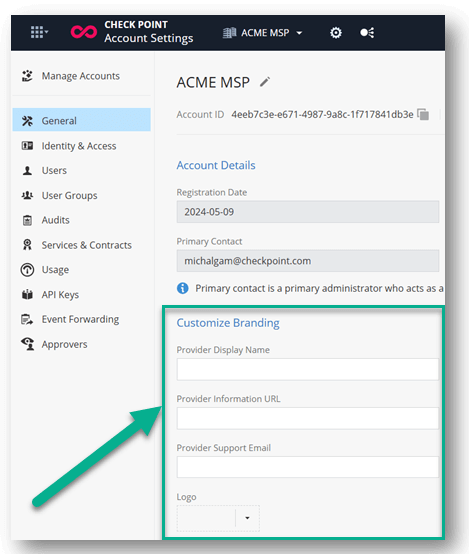
With this update, MSPs can now define additional branding elements specifically for admin and end-user email notifications – including display name, information URL, and support email – creating a more personalised and professional communication experience.
To customise these branding parameters, go to Manage Accounts > General > Customize Branding in the Infinity MSP Portal.
End User Experience Enhancements:
Previously, email previews in the portal were restricted to a fixed preview pane, limiting visibility and making it harder for users to review longer messages or emails with rich formatting.
Users can now easily switch to a full-screen view with a single click, providing a cleaner and more accessible way to review quarantined content before taking action. To preview an email in full screen, click the new expand button located in the top-right corner of the preview pane.
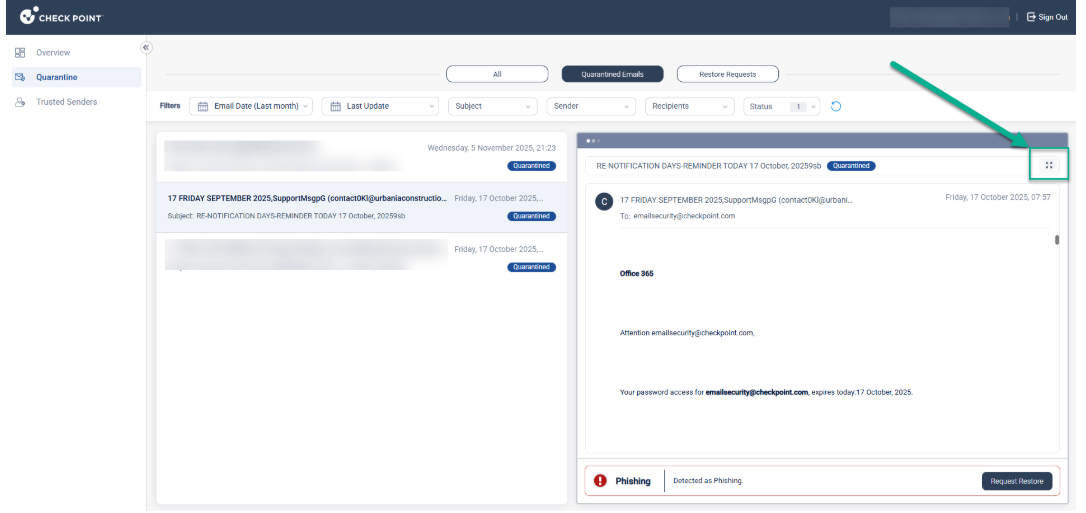
- End users can also now preview quarantined emails directly from the daily quarantine digest before deciding whether to restore them. This enhancement gives users better visibility into quarantined messages by offering a safe, quick way to inspect suspicious content without releasing it to the inbox.
- It’s designed to reduce the risk of false restores while streamlining the user experience.
Guardz
Incidents AI Analysis:
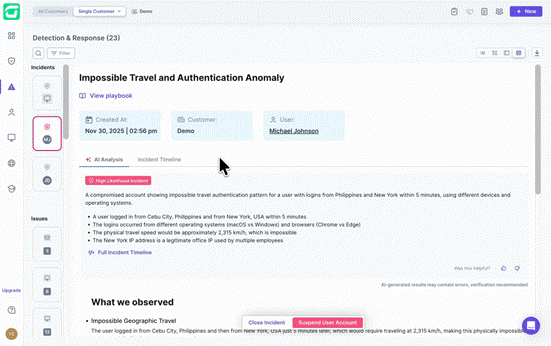
Incidents AI Analysis is now available across all ITDR incidents, providing immediate clarity, faster triage, and intelligent guidance to streamline your response workflow.
Improved triage and accuracy: Instantly access an AI-generated incident brief, key observations, recommended steps, and a verdict that helps reduce false positives for faster, more confident decision-making.
Broad availability: Automatically included for all customers and all plan types on incidents created from October 2025 onwards, with full support for AI verdicts, insights, and customer feedback.
Enhanced MDR Point-of-Contact Requirements:
Guardz are implementing a more robust contact verification system for Managed Detection and Response services. In a security incident, the speed of communication is as critical as the speed of detection and this update ensures Guardz security teams have a reliable, direct line to you when immediate action is required.
A new validation layer will now check for both a phone number and an email address for your designated MDR contact. Depending on your current account configuration, the platform will behave as follows:
- Missing All Contact Details:
- UI Impact: A mandatory banner will appear within the platform.
- Service Impact: MDR services will be Inactive until the required information is provided to ensure we have a viable escalation path.
- Partial Contact Details (Email or Phone only):
- UI Impact: A notification will prompt you to complete the missing information.
- Service Impact: MDR services will remain Active, allowing for continued protection while you update your profile.
The system will automatically resume MDR services the moment the required fields are saved in Account Settings.
Was this article helpful?
That’s Great!
Thank you for your feedback
Sorry! We couldn't be helpful
Thank you for your feedback
Feedback sent
We appreciate your effort and will try to fix the article