June Product Updates
Created by Claire Walker, Modified on Wed, 24 Jun at 12:01 PM by Claire Walker
SAT Module: Shadow IT & Unapproved Tools
A new Security Awareness Training module is now available to help employees understand the risks associated with using unauthorised workplace tools, including file-sharing services, AI applications, browser extensions, cloud services, personal accounts, and connected apps.
The module teaches employees:
- What Shadow IT is and why it creates organisational risk
- How unapproved tools can introduce security, privacy, and compliance issues
- How to evaluate whether a tool is safe to use for work
- When to involve the IT department
- Steps to take if an unapproved tool has already been used
Recipient-Based DLP Block List
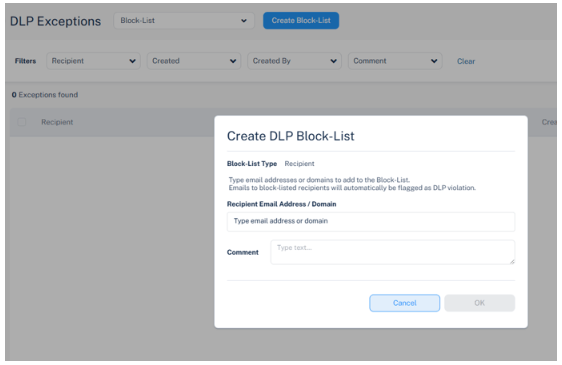
Administrators can now prevent users from sending emails to specific external recipients or domains, providing direct control over outbound communications to reduce data exposure and policy violations.
Configuration path:
Supported block types:
- Individual address — block a specific recipient email address
- Entire domain — block all recipients at a given domain
When a user attempts to email a blocked recipient, the message is automatically flagged as a DLP violation and the configured DLP workflow is triggered. Use cases include blocking former partners, competitors, personal email domains, or specific individuals.
End User Recovery of Falsely Reported Phishing Emails
When a phishing report is reviewed and determined to be safe — by Check Point's AI analysis or an administrator — users now receive the original email as an attachment in their notification, eliminating the need to contact support to recover the message.
How it works:
- User reports a suspicious email as phishing
- Microsoft 365 or Google Workspace removes the message from the mailbox during analysis
- Report is declined (email determined to be legitimate)
- User receives a notification with the original email attached
- User can immediately review, respond to, or forward the recovered email
Four Microsoft Defender Baselines
Octiga has introduced four critical Defender baselines to help MSPs standardise and strengthen Microsoft 365 email security posture across all customer tenants — reducing phishing, malware, malicious attachments, and dangerous URLs before users ever interact with them.
Baselines now available:
- Anti-Spam Inbound — filters inbound spam at the tenant level
- Anti-Malware — catches malware in transit before delivery
- Safe Attachments — sandboxes attachments before they reach users
- Safe Links — rewrites and scans URLs at click-time
These baselines are designed to simplify deployment and remediation at scale across an MSP's entire customer base.
Block Country Access
Octiga's Block Country Access feature restricts login attempts from high-threat geographic regions, stopping unauthorised access before it becomes a security incident.
Key benefits:
- Reduce login risk from high-threat regions
- Strengthen security across more tenants without additional cost
- Works with Microsoft 365 Business Basic — no Premium licence required
- Managed from a single MSP-focused platform across all customer tenants
Email Notifications for Entra Backup Events
Partners with the Owner role can now receive email alerts for key Entra Backup events, enabling faster response to issues requiring attention. Notification frequency is configurable to daily or weekly delivery.
Supported event types:
- Restore initiation
- Backup or restore errors
- System reauthentication required
Configure notifications directly in the NinjaOne SaaS Backup Partner Portal.
Google Shared Drive in Advanced Search
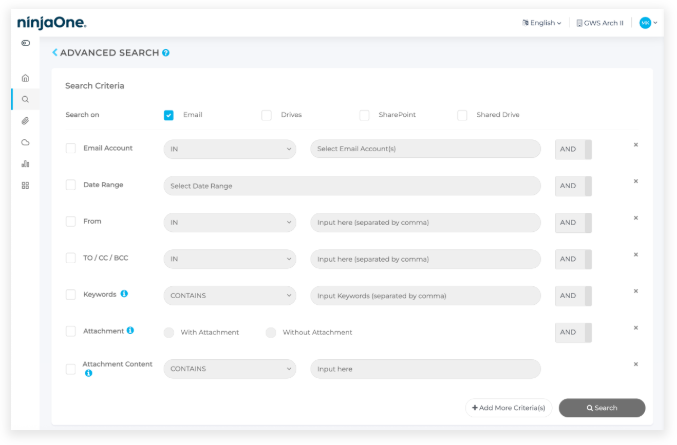
Advanced Search in the End User Portal now includes Google Shared Drives, enabling clients to search Shared Drive content alongside all existing sources using the same criteria, conditions, and operators.
Searchable sources now include:
- Google Drive (GDrive)
- Google Shared Drive — newly added
- Microsoft OneDrive
- SharePoint
How to use: Log in to the End-user Portal → navigate to Advanced Search → select products to include → fill in search criteria → click Search. Click Add More Criteria(s) for additional filter options.
Google OU/Group Filter Now Enabled for All Customers
You can now manage Google Workspace mailbox accounts based on Groups or Organisational Units (OUs) for better control and streamlined backup management.
- Filter and manage mailbox accounts by Google Group or Organisational Unit (OU)
- Now enabled by default for all customers
- No need to contact Support to request activation
Increased Entra Backup Frequency
Entra backup frequency has been increased from once every 24 hours to once every 8 hours, ensuring that newer changes in your environment are captured sooner.
- Previous frequency: every 24 hours
- New frequency: every 8 hours
- No configuration required — applies automatically to all customers
Default Retention Policy Now Required
A Default Retention Policy is now required to meet compliance and governance standards. You will be prompted at each login until setup is complete.
- A login prompt will appear until the Default Retention Policy is configured
- After the deadline, the prompt cannot be dismissed until setup is complete
- Backup operations will continue unaffected in the meantime
Elite Plan — Advanced Detection, Response & Forensics
Guardz has launched a new Elite plan, expanding on the existing Ultimate plan with advanced endpoint detection and response, outbound email security, active threat hunting, and forensic investigation capabilities.
Elite includes everything in Ultimate, plus:
- SentinelOne Complete EDR — deep telemetry and threat hunting
- Check Point Complete Email — outbound DLP and encryption
- Active threat hunting — continuous proactive monitoring
- Forensic deep-dive investigations — advanced incident analysis
Was this article helpful?
That’s Great!
Thank you for your feedback
Sorry! We couldn't be helpful
Thank you for your feedback
Feedback sent
We appreciate your effort and will try to fix the article