Overview
We have received advanced notice of vendor pricing changes impacting MPexchange (EXCH690) taking effect in 2026. Combined with the growing security and productivity advantages of Microsoft 365, now is an ideal time to consider migrating your clients to Microsoft 365 Exchange Online. This article outlines the upcoming price changes, the case for migration, and what the move involves.
What is changing?
In September 2026, there will be a price change where all MPexchange pricing will increase by 15%.
What are my options?
If you do not wish to absorb or pass on this price change, you may wish to consider moving clients to Microsoft 365, plus mail filtering and back-up/archive.
Microsoft 365 includes enterprise-grade threat protection built for today's environment. This includes advanced anti-phishing, anti-malware and safe links capabilities across email and collaboration tools.
Microsoft 365 also gives your clients access to Copilot, as well as the option to introduce Avanan email protection.
Depending in your client needs, here are some alternative options:
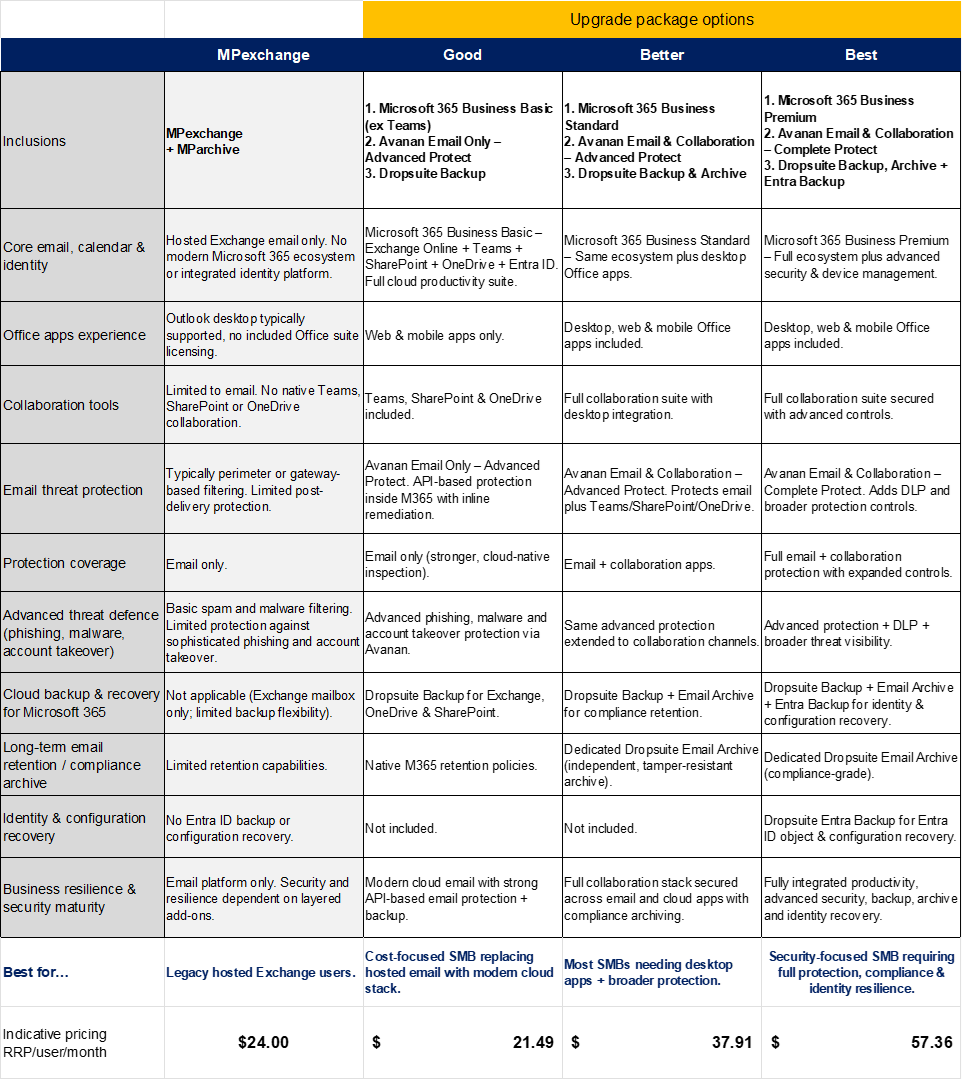
What migration involves
Migration from MPexchange to Microsoft 365 Exchange Online covers the transfer of mailboxes, email history, and calendar data. Existing mail filtering and routing configurations can typically be replicated within Microsoft 365's mail flow tools. Classic Outlook remains available post-migration, so end users are not required to change how they access their email.
FAQs
How much storage will I get with Microsoft 365?
Microsoft 365 Business Basic, Standard, and Premium plans each include 1TB of cloud storage per user, with auto-expanding archive capabilities for older email.
My clients need their data to stay in Australia. Microsoft is a US company: can I guarantee data sovereignty? Yes. Microsoft offers a paid data residency option that allows you to nominate a specific country where your clients' data will be stored and processed. For Australian clients, this means their data can be guaranteed to remain in Australia. Your account manager can walk you through the details and pricing.
My clients are used to classic Outlook. I don't want to force them to change. Classic Outlook is still available and your clients can continue using it. That said, Microsoft has indicated that the new Outlook experience will eventually replace it, so it's worth preparing clients for that transition over time. The good news is that the migration itself won't change anything about how they use Outlook today.
I chose MPexchange specifically to avoid dealing with Microsoft. That's a fair position, and we understand it. However, the upcoming Intermedia pricing changes mean that staying on MPexchange is likely to cost more. We're not asking you to love Microsoft, just to weigh up whether the cost of staying makes sense for your business. And we are always here to help :)
I have everything set up the way I like it - filtering, routing, custom configurations. Migration feels like too much work. This is one of the most common concerns we hear, and it's exactly why we're offering free migration. We'll handle the heavy lifting, including replicating your existing configurations where possible. Microsoft 365 also gives you robust tools for filtering and mail flow management, so you won't be starting from scratch. Let's have a conversation about your specific setup and we can map out what the transition would actually look like.
MPexchange offers unlimited mailbox sizes. Microsoft 365 doesn't - what happens to clients with large mailboxes? Microsoft 365 Business Basic, Standard, and Premium all include 1TB of cloud storage per user which should be enough for the vast majority of clients. It could be time to look at your clients' data footprint, and whether it's time to clean up some Redundant, Obsolete, and Trivial data.
I only trust my own migration tool or process. I'm not comfortable using whatever you're using. That's completely fine. We're happy to work alongside your preferred migration tool or approach. Our free migration offer is here to help, not to override your process. If you have a method that works for you and your clients, we can support that and simply ensure the M365 environment is set up correctly on our end.
Will this mean reconfiguring all my clients' phones and tablets? In most cases, the transition is straightforward. Microsoft 365 Exchange Online is designed to work seamlessly with modern iOS and Android devices, and typically requires only minor reconfiguration - usually updating the account settings in the device's mail app. In our experience, it plays more nicely with current phones and tablets than MPexchange does. If you have clients with specific device setups you're concerned about, we're happy to work through those with you ahead of migration.
Was this article helpful?
That’s Great!
Thank you for your feedback
Sorry! We couldn't be helpful
Thank you for your feedback
Feedback sent
We appreciate your effort and will try to fix the article