The Breach Prevention & Productivity (BPP) is a cybersecurity education tool to help train employees on cybersecurity best practices. As part of this tool, you have been given access to your own unique training portal to start your learning journey and improve your cybersecurity posture.
This powerful tool comes with many features, which can be reviewed below. Quickly access key sections within this guide:
Security Policies & Procedures
Employee Secure Score
Each employee will be given an Employee Secure Score (ESS). This score is generated by combining many of the key metrics listed below. You can think of your ESS as a credit score for your how security strength. The higher the ESS, the more likely you are to defend against a data breach.
Tips for maximizing your ESS:
- You’ll receive ESS points for acknowledging all policies & procedures.
- You’ll receive ESS points for completing your annual HIPAA security awareness training. You can retake your quiz at any time to get a higher final score.
- The more micro-training quizzes you miss, the more it will negatively impact your ESS.
- Falling for a phishing email will negatively impact your ESS.
- If your email address is found on the Dark Web, your ESS will be negatively impacted.
The leaderboard within your Dashboard lets you compete head-to-head with your co-workers to see who has the highest ESS! Don’t forget to pick a good screen name within the Edit Profile section. Have fun and enjoy the healthy competition!
Micro Training
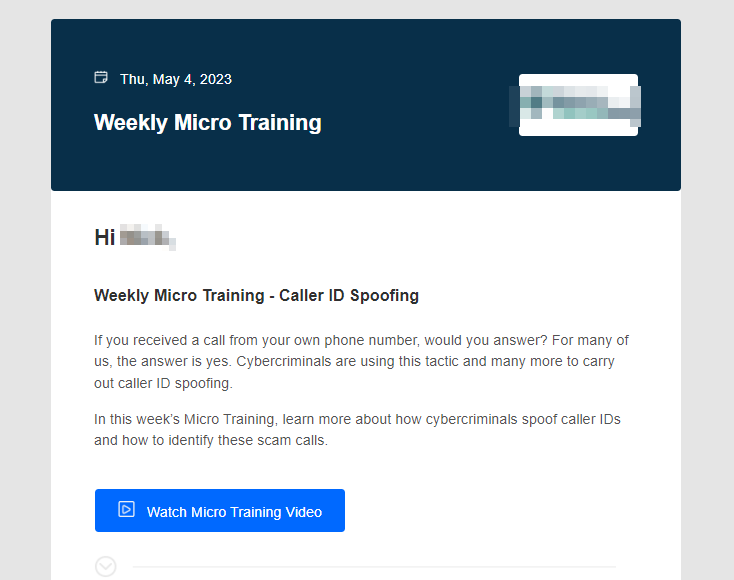
Each week, you’ll be sent an email to watch a 2-3-minute Micro Training video on the latest cybersecurity threats. Complete the 4-question quiz at the end of the video to increase your Employee Secure Score!
You will receive a Micro Training email every week, however, the last week of the month will be replaced with a Security Newsletter.
Security Policies & Procedures
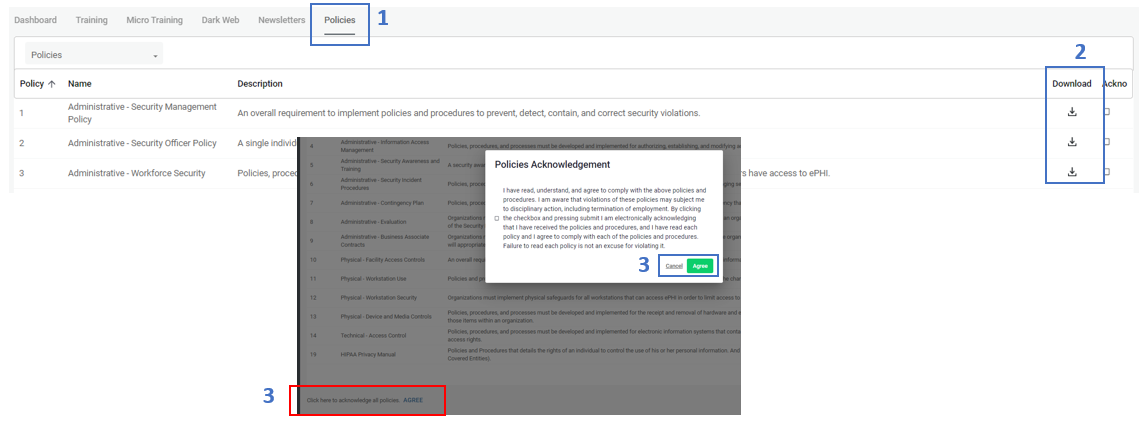
Our organization’s Security Policies & Procedures are uploaded into the portal. You will need to read through each one, verify that you understand the policy/procedure and our expectations, and electronically acknowledge your commitment to abide by them.
1. In the My Dashboard section, select the “Policies” tab at the top of the page.
2. Here you will see your policies & procedures. Click each policy to view the quick description. The full policy can be downloaded and viewed.
3. Once you have read and understand all the policies & procedures, you’re ready to acknowledge your cooperation with our organization’s policies & procedures. To do so, click “Agree” at the bottom of the page. In the confirmation box that appears click Agree to indicate your acknowledgement.
Policies & Procedures FAQs:
Why do I have to acknowledge policies & procedures?
You can’t follow the rules if you don’t know them, right? That’s why it is extremely important that you know about each one of our organization’s policies & procedures. Not only do you need to know these policies & procedures exist, but you must understand them and agree to comply with them.
Are the policies and procedures built into the portal?
Yes. All of our policies and procedures have been uploaded into one convenient location for you to reference.
What if I have questions or don’t understand one of the policies or procedures?
It is critical that you understand our expectations with all policies and procedures. If you have any questions or would like to discuss any of these items, please contact a member of our management team.
What do I do after I’ve reviewed all our policies and procedures?
Once you’ve gone through each one of our policies and procedures and understand our expectations, you’re ready to electronically acknowledge that you agree to abide by them.
Dark Web Monitoring
As part of this program, we will continually monitor the Dark Web for your email address and notify you if it is discovered, that way you can take the appropriate next steps like quickly updating your passwords.
This program also allows you to scan your personal, friends, or family members’ email addresses to find out if they’re out there on the Dark Web. Perform as many scans as you’d like! The more you know, the better you can protect yourself and your loved ones.
Phishing
We will be sending routine phishing emails to test you on the various types of phishing attacks you could encounter in real life. Phishing is the number one attack method for cybercriminals, so being able to spot a malicious email will go a long way in protecting yourself, and our organization.
Annual Cybersecurity Training
You’ll be required to complete annual security awareness training. This training course will get you familiar with real-life examples of how data breaches occur, and how you can prevent them. In addition, you’ll learn all about how to protect personally identifiable information (PII).
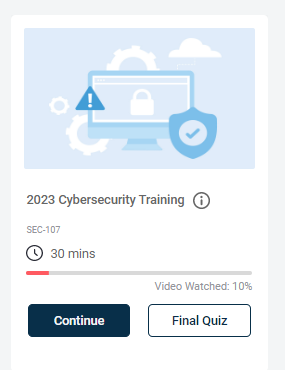
1. Select the “Training” tab at the top of the page.
2. On this screen, begin with Watch to complete your training program.
3. Once you’ve gone through the training course, move on to the Final Quiz to complete your 20-question quiz.
4. Once you complete your quiz (with a score of 80% or higher), you will have the option to print your training certificate.
Security Awareness Training FAQs:
How long does the training take?
Training should take approximately 40 minutes to complete.
Do I have to complete the training in one sitting?
No. You can start and stop the training at any point. When you return to finish the training, make sure you click “resume” to pick up where you left off.
How do I get credit for completing the training?
You must complete a 20-question quiz following the course. You will need to receive a passing score of 80% to satisfy this requirement. Upon successful completion, you will receive a training certificate indicating that you have passed the course.
Was this article helpful?
That’s Great!
Thank you for your feedback
Sorry! We couldn't be helpful
Thank you for your feedback
Feedback sent
We appreciate your effort and will try to fix the article