Please note these changes may be rolled out gradually.

Microsoft
1. M365 & O365 - New Features and Pricing Adjustments
Microsoft has announced new features and price changes for Office 365 and Microsoft 365 including adding Defender for Office 365 Plan 1 to E3 licences, introducing additional Intune capabilities to Microsoft 365 E3 and E5, and increasing mailbox storage by 50 GB for Microsoft 365 Business plans.
Please see separate article here for full details

NinjaOne SaaS Backup (formerly known as Dropsuite)
Introducing two upcoming requirements that will be enforced in June.
1. Default Retention Policy (prompt now showing in-portal)
Starting this month, users will see a prompt in the end-user portal to set a default retention policy. It’s optional for now, so you can skip it and come back later, but we recommend setting it up early.
Retention policy defines how long NinjaOne SaaS Backup keeps your email, Microsoft OneDrive, and Microsoft SharePoint backup data, and when the system securely removes it. Once set, your default retention policy applies across supported data types (Email, OneDrive, and SharePoint) and helps keep coverage and compliance consistent.
Setting a default retention policy is mandatory, while custom retention policies are optional. Users must configure a default retention policy before the deadline of 2026-06-01. To remind you to set a default policy, the system displays a dialog box after a successful login to the portal. We recommend completing the setup as soon as possible, but you can choose a time that works best for you. If you miss the deadline, the reminder dialog box will appear when you log in, and you won't be able to dismiss it until you complete the setup. However, backup operations will continue running and will not be affected.
Set Up a Default Retention Policy
NinjaOne SaaS Backup allows only one default retention policy, which applies across all workloads, so you must configure carefully. Follow the steps below to configure a default retention policy.
From the dashboard dialog box, click Set Default Retention Policy.
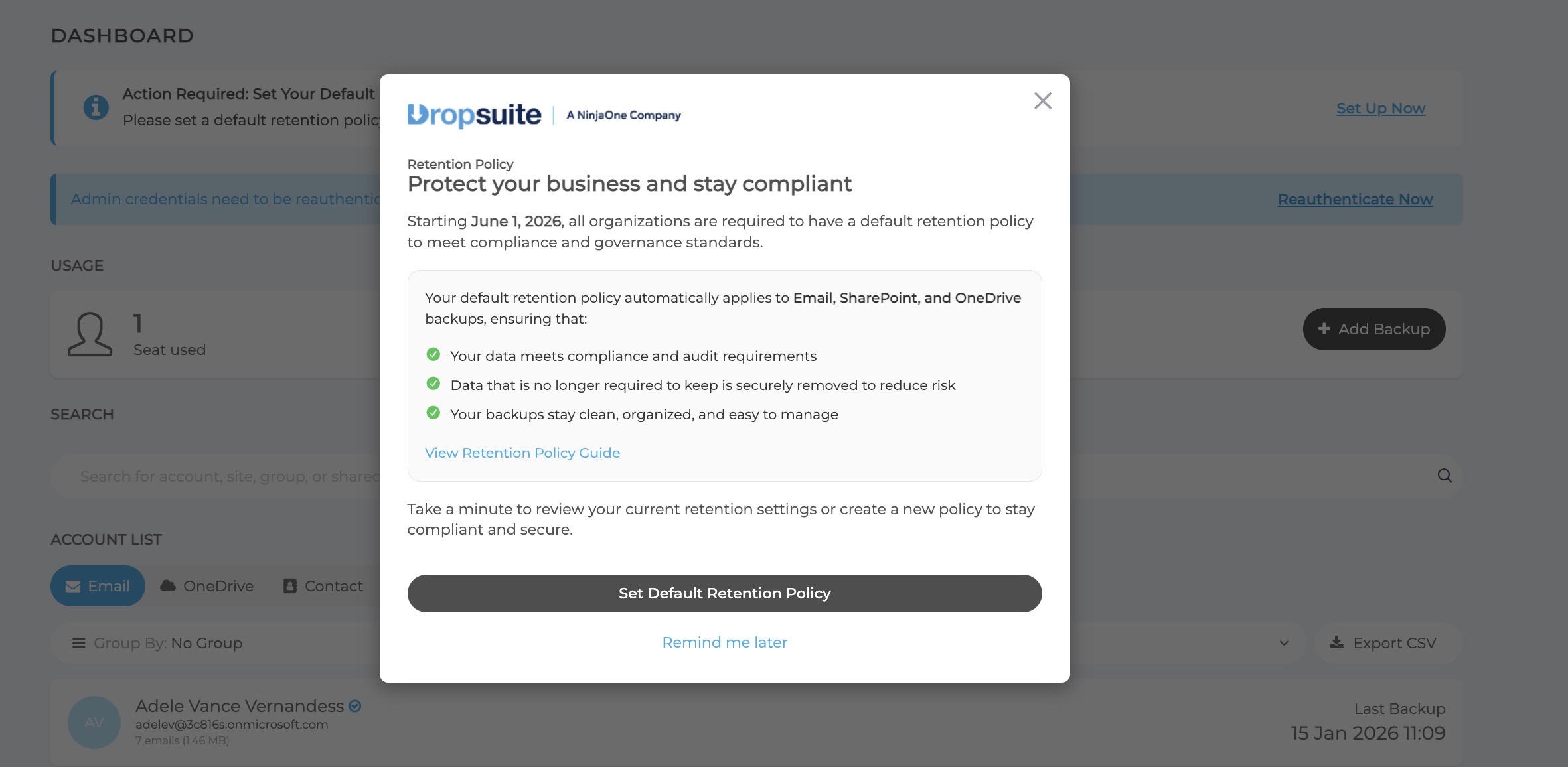
Figure 1: Set Default Retention Policy (click to enlarge) Alternatively, you could click Set Up Now from the dashboard banner.
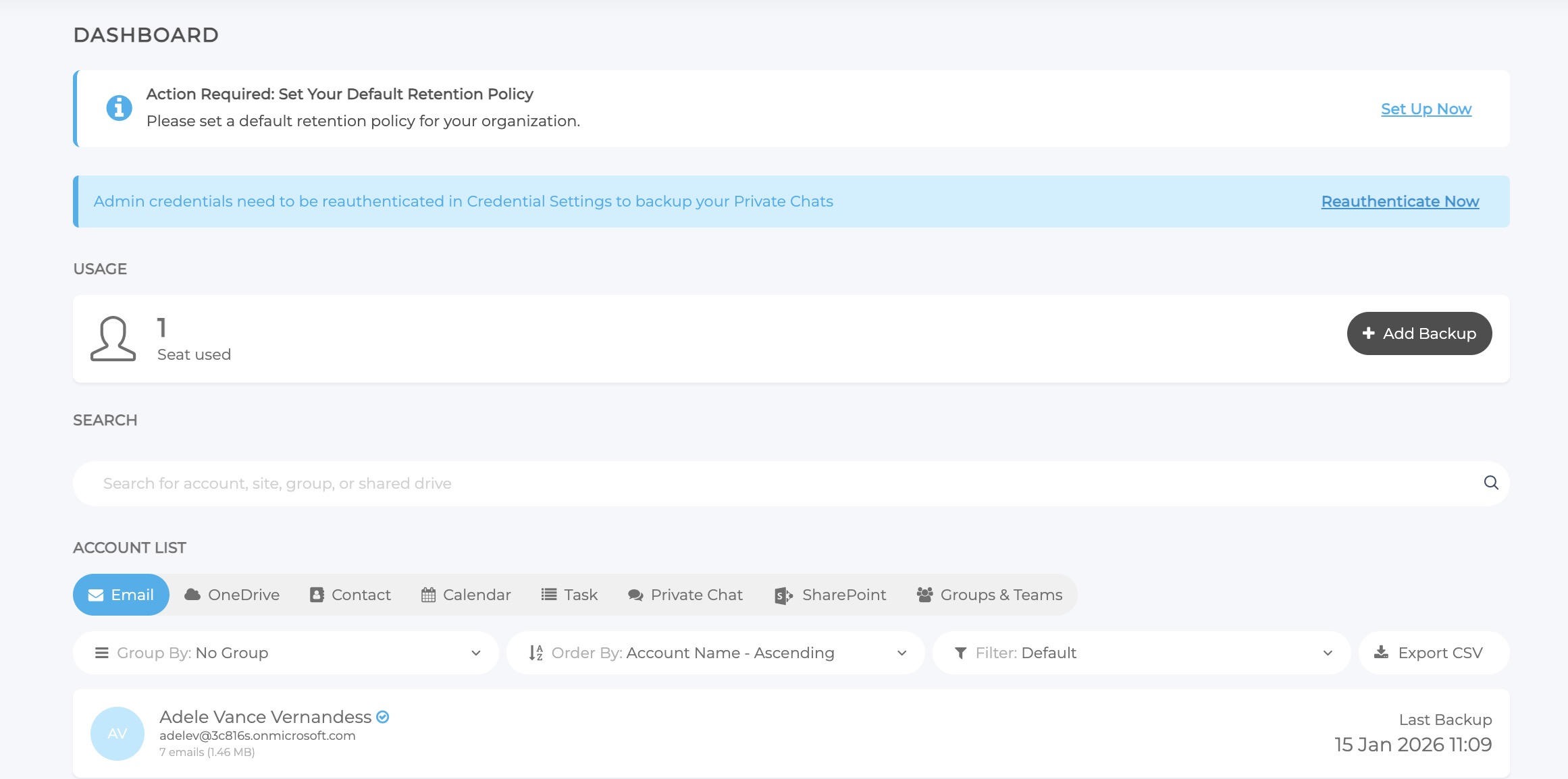
Figure 2: Dashboard banner (click to enlarge) Or lastly, from the Retention Policy banner, you can click Set Up Now.
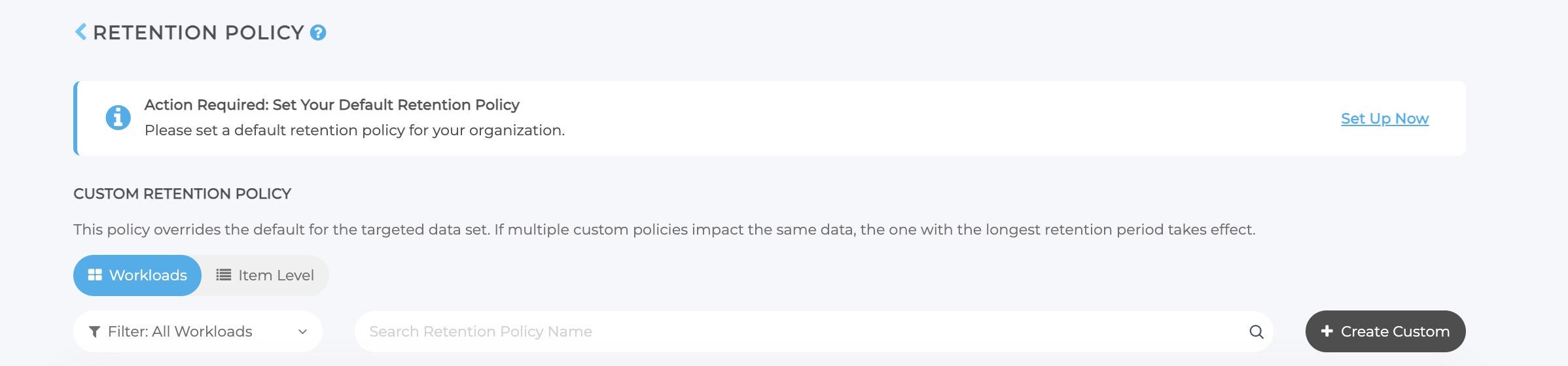
Figure 3: Retention Policy banner (click to enlarge) Any of the above actions will open the Default Retention Policy Setup dialog box.
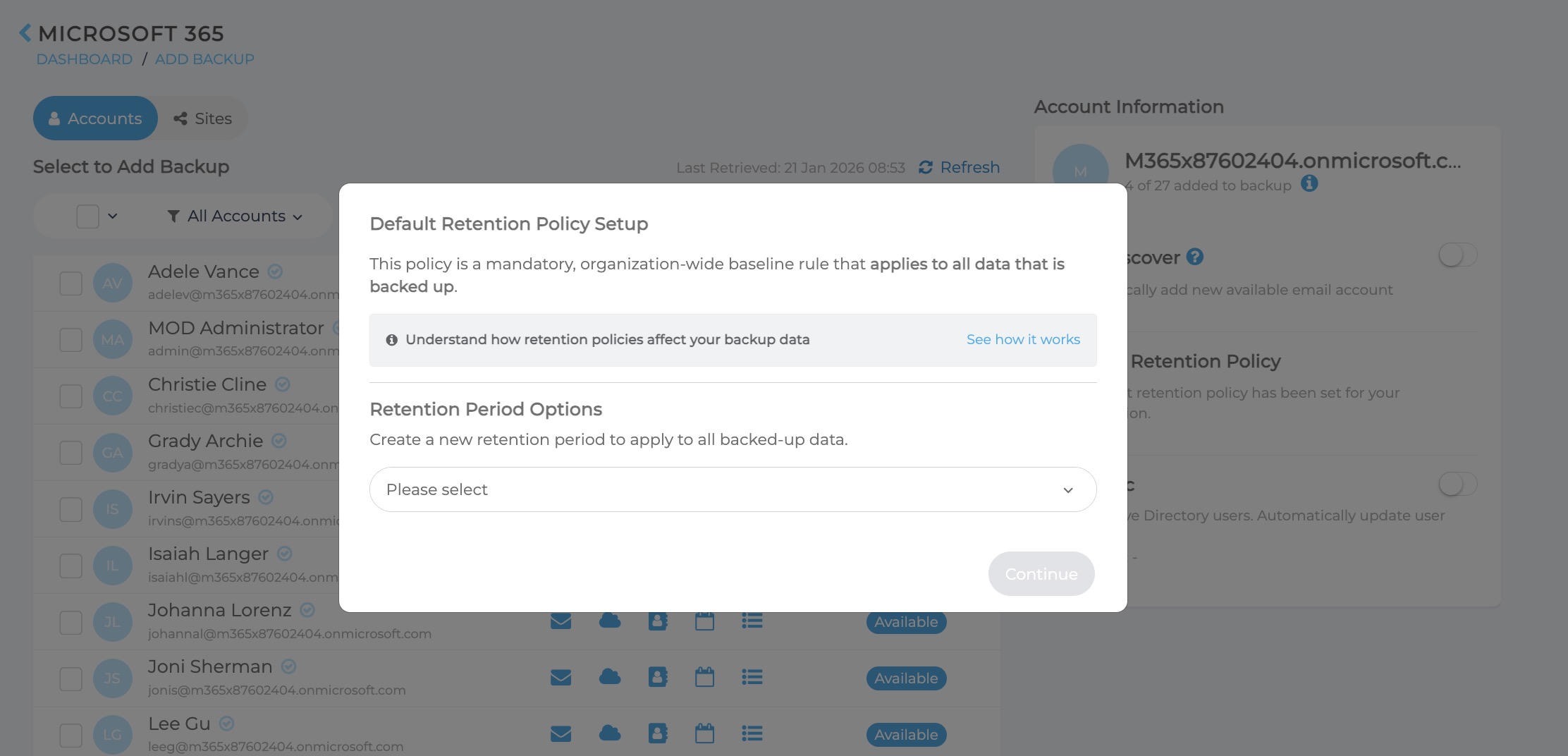
Figure 4: Default Retention Policy Setup (click to enlarge) - Select the Retention Period from the drop-down menu. If a default retention policy already exists, the current retention period will be displayed.
- If this is a new setup, select the retention period you want to apply.
- A confirmation dialog box will appear. Select I agree with this Retention Policy Behavior.
Click Apply Policy.
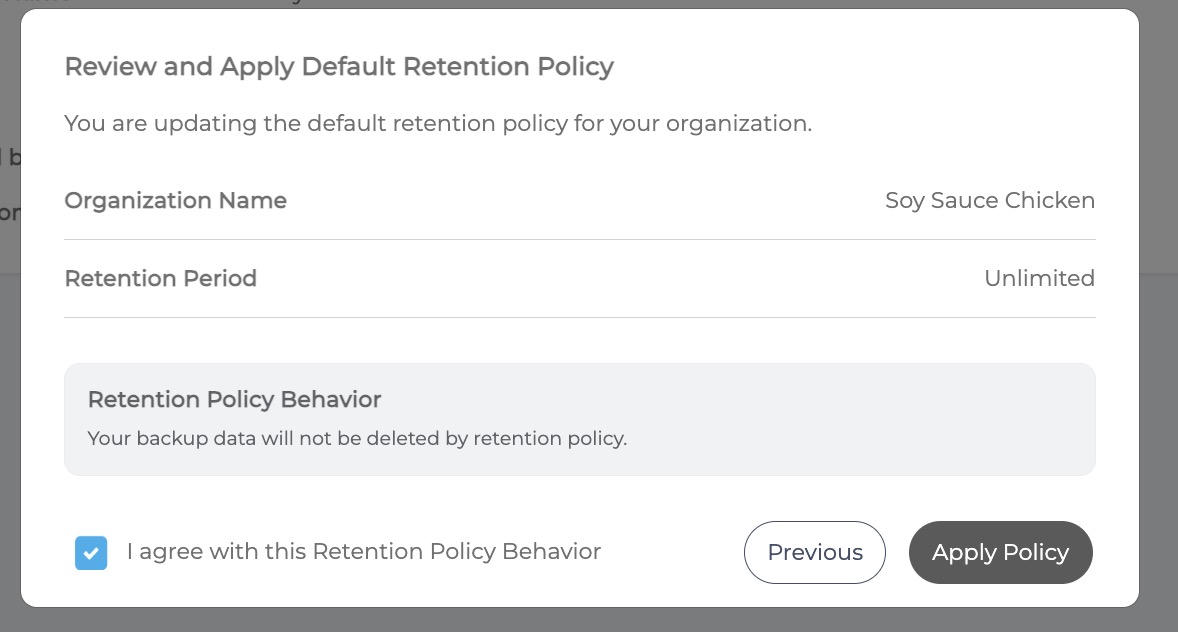
Figure 5: Review and Apply (click to enlarge) The Retention Policy setup page will display a success message and the policy details.
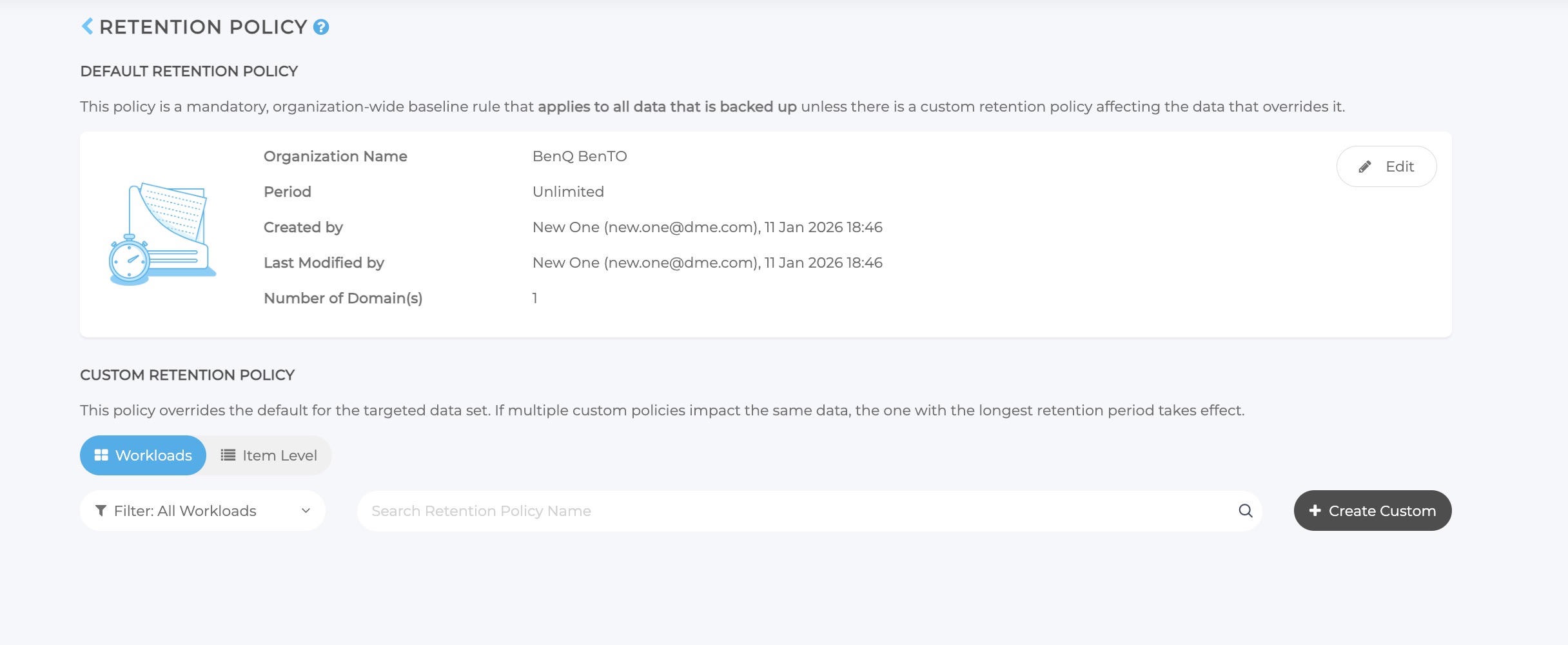
Figure 6: Retention Policy (click to enlarge)
2. MFA Enforcement Prep
Ninja are also continuing their MFA rollout. With the updated login experience, MFA prompts show on the login page but can be skipped when enforcement is disabled.
If you haven’t already, this is a good window to enable and adopt MFA so teams are comfortable before June.
3. Microsoft Exchange Web Services Deprecation
Microsoft is updating how third-party applications connect to Microsoft Exchange Online. Starting 1 October 2026, Microsoft will block specific older connection methods.
NinjaOne SaaS Backup has already been updated to align with this change. Affected organisations are now required to reauthorise their Microsoft 365 (M365) instances no later than 2026-06-01, ahead of Microsoft's enforcement date.
Please see separate article here for full details

Check Point Avanan
1. Exceptions for Attachment/File Cleaning (Threat Extraction)
This update adds exceptions for Attachment/File Cleaning, allowing admins to create allow-lists based on sender addresses, domains, or file hashes so certain files can bypass cleaning. Threat Extraction uses Check Point’s Content Disarm and Reconstruction (CDR) to remove potential malware from attachments while keeping files usable. However, teams in finance, legal, or compliance may need the original file.
With these new exceptions, trusted senders or verified files can be delivered unmodified, maintaining strong security while avoiding disruption to important business processes.
How to Enable Exceptions for Threat Extraction
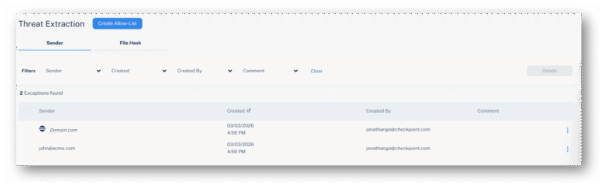
Go to Security Settings > Exceptions > Threat Extraction and define your desired allow-lists:- Sender address or domain – Attachments in emails from specified senders or domains will not be cleaned before delivery to end users.
- File hash – Attachments matching approved hashes will not be cleaned before delivery to end users.
2. Automatic Personalisation of End User Browser-Based Interaction Language
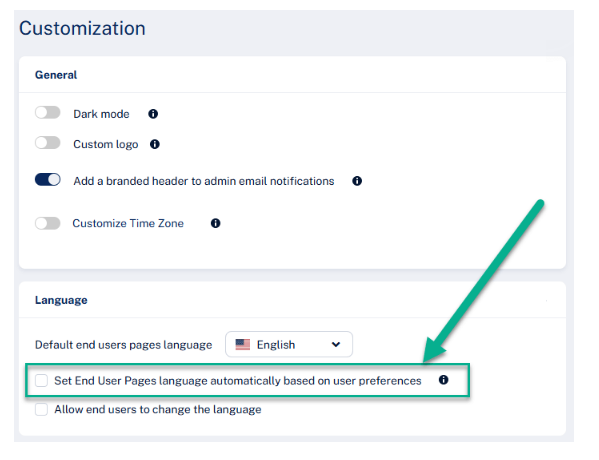
Avanan now automatically personalises the language of browser-based user interactions based on each user’s Microsoft 365 or Google Workspace language settings.
Previously, organisations could set a single language for the user interface, which worked well for single-language environments. However, globally distributed teams often require different languages.
With this update, the platform automatically matches the interface language to each user’s existing settings, ensuring security notifications and remediation flows appear in their native language from the first interaction.

Guardz
1. Migration Update: Built-in Protection Deprecation
To ensure every partner has a smooth transition during the Avanan migration, Guardz are extending the support timeline for the legacy built-in protection.
- What changed: The deprecation date has been postponed by one month to March 31.
- Why: We want to ensure no customer is rushed and that all configurations are fully verified.
- Impact: You have additional breathing room to finalise migrations. We will continue to monitor progress and may push this further if more time is needed.
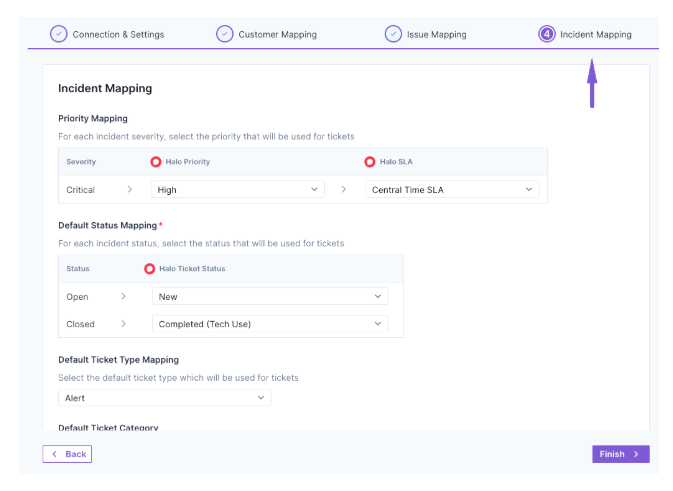
2. PSA Integration: The Big Upgrade - HaloPSA & Syncro support + Incident Syncing (GA)
Guardz have delivered a major overhaul to PSA integrations, addressing one of the most frequent partner requests: Incident Syncing.
- What changed: HaloPSA and Syncro support have been added, a redesigned setup wizard with better SLA/priority mapping, and separate configurations for issues vs. incidents. You’ll also notice a refreshed UX, including a clear last sync indicator.
- Why: MSPs needed a way to flow high-priority security incidents (not just general issues) directly into their existing ticketing workflows for faster response.
- Impact: Full feature parity across all supported PSAs. All existing configurations were automatically migrated - no action is needed for current setups, but you can now use the new wizard to enable incident syncing for even tighter integration.
3. Email Protection: Monitor Only Mode
Check Point Email Protection now includes a Monitor Only activation option, now generally available.
- What changed: During activation, you can now choose "Monitor Only" (the default remains "Protect").
- Why: This allows for "silent" audits where threats are detected and alerted without being automatically blocked, helping you demonstrate value before fully engaging protection.
- Impact: Ideal for baselining a new environment or prospecting. Note that in this mode, threats may still reach mailboxes and require manual remediation; look for the "Protect me now" prompt to enable full blocking.
4. ITDR Approved Locations
Important update to Approved Locations within the ITDR security control for Microsoft 365 workspaces. Approved Locations uses IP geolocation to evaluate sign-ins against a list of trusted locations that you define, used to improve the accuracy of location-based ITDR detections and reduce false positives.
Now, depending on the mode you choose, sign-ins from outside your approved locations can either improve detection accuracy, generate an alert for your review, or trigger automatic user suspension.
Immediate action is required
Cities are no longer supported. Any city-level entries you previously added will no longer appear.
Please log in to Guardz and review your Approved Locations list to make sure the correct countries, US states, and/or IPs are added for your users.
You can update your settings by navigating to: Security Controls > ITDR > Approved Locations > Manage Whitelist
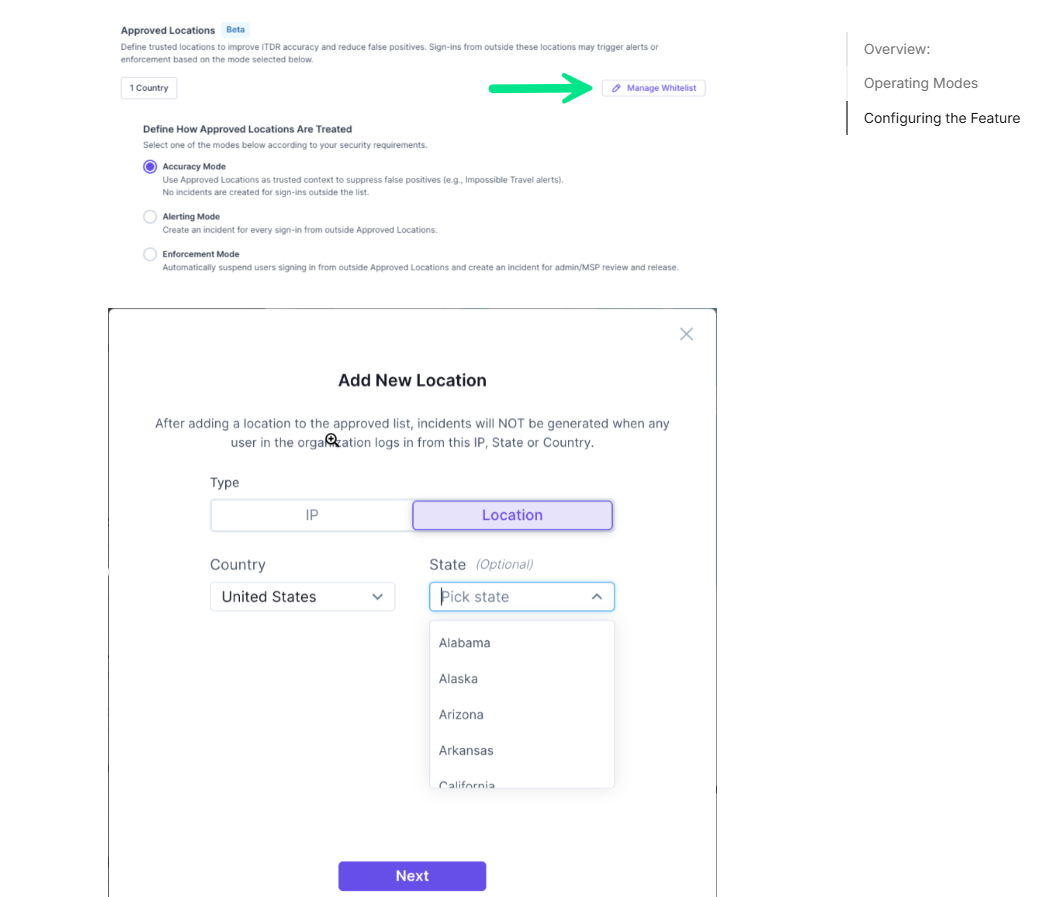
How Approved Locations can be treated based on your selection
1. Accuracy Mode - Use Approved Locations as trusted context to reduce false positives in location-based detections. No incidents are created solely because a sign-in occurs outside the approved list.
2. Alerting Mode - Create an incident for every sign-in from outside Approved Locations. Users are not automatically suspended. Incidents are sent directly to the admin/MSP for review.
3. Enforcement Mode - Automatically suspend users who sign in from outside Approved Locations and create an incident for admin/MSP review and release. These incidents are not reviewed by the MDR team, and admins/MSPs are responsible for reviewing and releasing users when needed.
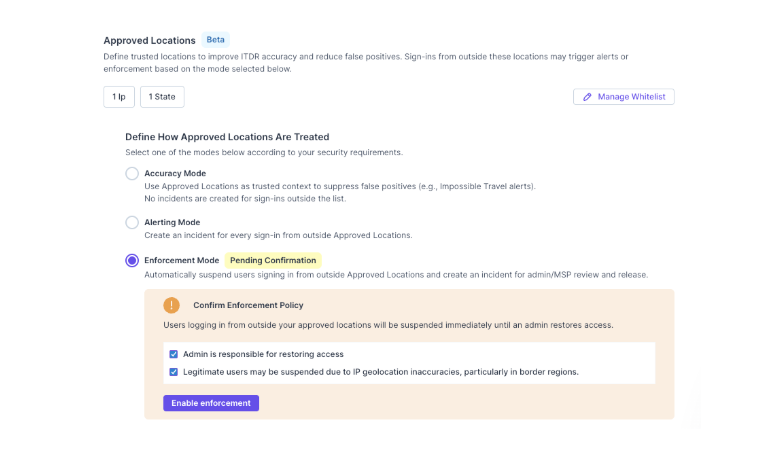
These settings apply specifically to location-based detections such as Impossible Travel and Unfamiliar Location. Other suspicious identity activity will continue to be handled through the standard ITDR and/or MDR workflows.
We recommend starting with Alerting Mode first so you can validate and fine-tune your approved locations before moving to Enforcement Mode. Please keep in mind that user-specific exceptions are not currently supported, though we are evaluating additional flexibility in future enhancements.
A few additional notes
• This feature currently supports Microsoft 365 only
• Google Workspace parity is planned for a future release
• VPN provider detection is not yet supported, though IP ranges can be added manually
• Geolocation is never 100% accurate
• Only US states are supported for state-level entries; non-US states will no longer appear
Was this article helpful?
That’s Great!
Thank you for your feedback
Sorry! We couldn't be helpful
Thank you for your feedback
Feedback sent
We appreciate your effort and will try to fix the article