Please note these changes may be rolled out gradually.

Microsoft
1. M365 & O365 - New Features and Pricing Adjustments
Microsoft has announced new features and price changes for Office 365 and Microsoft 365 including adding Defender for Office 365 Plan 1 to E3 licences, introducing additional Intune capabilities to Microsoft 365 E3 and E5, and increasing mailbox storage by 50 GB for Microsoft 365 Business plans.
New features will be added to the SKUs in 2026.
In the meantime, price adjustments ranging from 5% to 33% will take effect on July 1, 2026, for both new and renewing subscriptions across Commercial and Not for Profit customers.
2. Subscription Grace Period Discontinued
From 4 May 2026, the free 30-day grace period for non-renewed subscriptions will be removed. If a subscription reaches its end date without renewal, customers will no longer receive temporary free access to services.
Partners and customers will need to choose one of three options at the end of term:
- Renew the subscription before expiry to avoid any service disruption.
- Cancel at expiry, which immediately stops service. Data retention policies still apply, but the subscription cannot be recovered or reactivated.
- Move to a paid Extended Service Term (EST) to continue service.
Under EST, billing is monthly at the current monthly term rate plus a 3% uplift. If no monthly plan exists, the uplift is 23%. See the Extended Service Term article from Microsoft for details on this announcement and the impact to you and your customers.
3. Copilot Business Promo Price extended + Monthly/Monthly Billing
- Promotional Pricing for Copilot Business and Copilot Business Bundles has been extended until 30 June 2026.
- Monthly/Monthly Billing is now available for Copilot Business and Copilot Business Bundles (from 1st March, 2026) with a 20% premium over annual/annual billing.
- 30% off Copilot for Microsoft 365 is now available for 300+ new copilot seats.
- 40% off Copilot for Microsoft 365 is now available for 1,500+ new copilot seats.

Guardz
1. SentinelOne Firewall disabled by default
To avoid conflicts with existing firewall solutions, the SentinelOne Firewall is now disabled by default. This change helps ensure SentinelOne does not interfere with any third-party or native firewall configurations already in place. If you had the SentinelOne firewall active in any tenants where we disabled it due to the default change, you would have received an alert in the Guardz platform via an info-only issue.
In most cases, no action is needed and this issue can be read and archived/resolved.
If the FW is active with a specific configuration - the change will not apply.
Here are some recommended next steps based on common scenarios:
- If you are already using another firewall solution: No action is required.
- If you want SentinelOne to manage firewall protection: You can re-enable the SentinelOne Firewall and configure rules directly in the SentinelOne console. Once you break inheritance, SentinelOne’s default settings will not interfere with your custom rules.
- If SentinelOne Firewall was previously enabled and you don't have another solution in place: Please review your environment’s Windows Firewall settings, as it may now be active. Ensure policies and rules are configured appropriately.
2. Secure Web Browsing will be officially deprecated on February 15th
Once the deprecation date is reached, the following changes will automatically take place:
- Users will be signed out of the browser extension and will need to remove it
- Any open issues related to Secure Web Browsing will be automatically archived and no new ones will be generated.
- The Secure Web Browsing security control will be deleted, along with any remaining web browser references across the platform
A notification banner will appear in the Guardz platform.
3. Phishing Simulations - Injection-Based Delivery
- This update introduces injection-based delivery, a method that ensures higher reliability by bypassing traditional mail filters to reach user inboxes directly.
- MSPs can activate this feature via Security Controls or the SAT page, though global campaigns require permissions from all managed organisations before they can be sent.
- The rollout also includes updated phishing attachment templates to increase the variety and realism of simulation content.
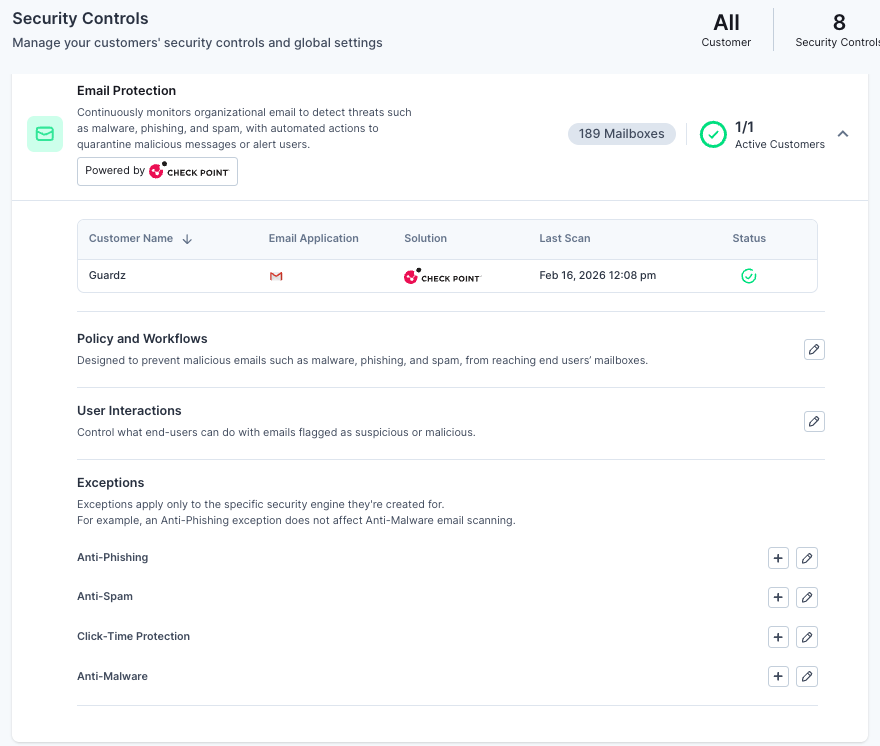
4. Unified Email Security Exceptions
- Guardz has released a new version of its exceptions management that allows for granular filtering based on specific criteria including Email Address, Domain, IP, Header, and File Type.
- Users can configure both Allow and Block lists, using the same configuration logic found in the Avanan portal to streamline security workflows.
- To simplify administration, the system now supports bulk management via CSV uploads, allowing multiple entities to be added to allow lists simultaneously.
NEW Guardz have now rolled out an updated version that includes all exception types available in Avanan.
These now include Anti-Spam, Anti-Malware, ClickTime Exceptions and Anti-Phishing.
This enhancement simplifies the customer experience and provides greater flexibility, allowing for more comprehensive exception management. It also ensures better alignment with Avanan's capabilities while improving control and visibility.
5. Security Controls Performance Optimisation
- The Security Controls page now features independent asynchronous loading, meaning each control status loads separately so users can interact with ready controls immediately.
- These technical enhancements have resulted in a 30-65% reduction in average response times, significantly improving the experience for MSPs managing multiple organizations.
- Security control statuses are typically visible within seconds of opening the page, eliminating previous delays caused by waiting for all data to load at once.
6. Mobile-Optimised Email Quarantine
The email quarantine page in the user portal has been redesigned with a "Light Card View" specifically tailored for mobile screens to provide full functionality on the go.
- Despite the mobile-first design, the interface remains fully searchable and is optimized for smooth hardware performance.
- Users can easily preview quarantined emails, view headers, and restore messages directly from their mobile devices.

Check Point - Avanan
1. Enhanced Infrastructure to Support Inline Inspection for Microsoft 365 Emails
Avanan is upgrading its infrastructure to enhance inline inspection for Microsoft 365 emails and align with Microsoft platform requirements. Updates include a new connector, added sending infrastructure in the Tenant Allow/Block List, transport rule exclusions, and new IP exclusions, ensuring seamless inspection and policy enforcement across Microsoft 365 and Azure environments.
2. New Training Module: Microsoft Teams Phishing Awareness
Introducing new phishing awareness training focused on Microsoft Teams. The training helps users identify phishing attempts within Teams chats through realistic scenarios, teaching them to spot red flags, verify requests, avoid malicious links and report suspicious activity to IT.
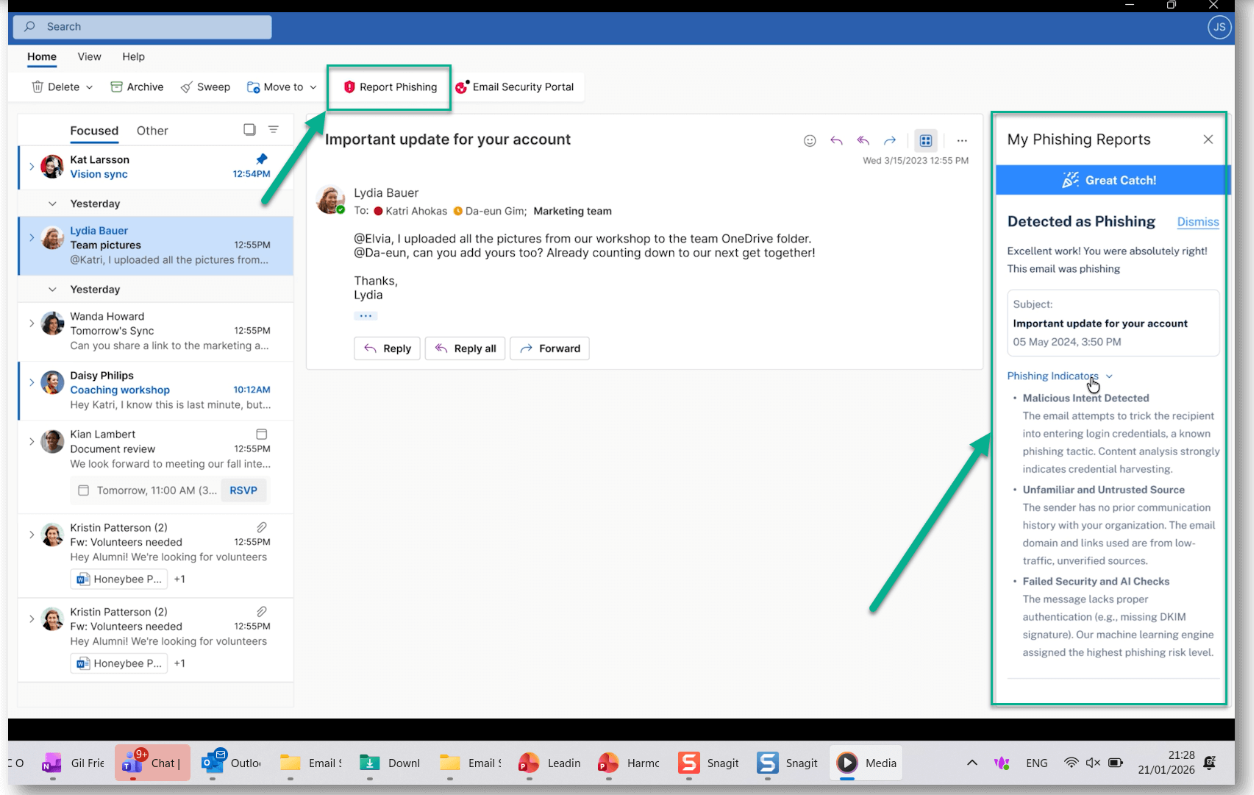
3. Misdirected Emails Prevention and Enhanced Usability – In Outlook
Check Point has introduced a new Outlook Add-In for Avanan Email & Collaboration, providing in-context alerts and remediation for misdirected emails, phishing reporting, and direct access to the End User Portal within Outlook. Users receive real-time notifications and one-click fixes for misdirected emails, plus instant, GenAI-powered feedback when reporting phishing.
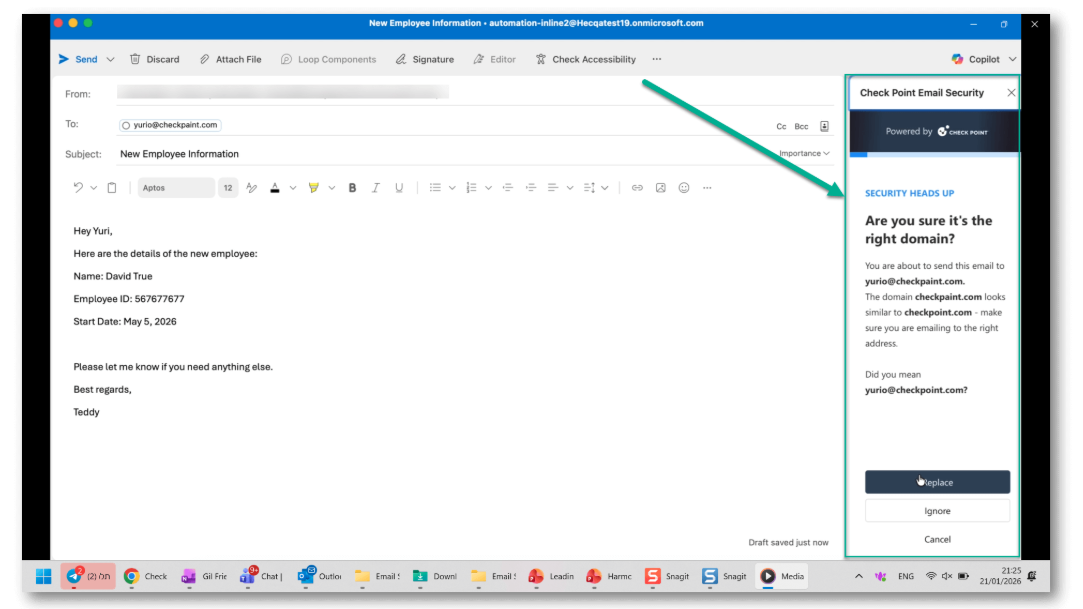
To configure and deploy the Outlook Add-In:
- In the Avanan portal, navigate to: User Interactions > Misdirected Email > Add-In Configuration
- Select the Outlook version and enable the desired add-in use cases.
- Click Save and Download XML to generate the add-in configuration file.
- Use the Microsoft Administration Center to deploy the add-in by uploading the XML file and assigning it to users.
Note – To be entitled to the Misdirected Emails protection, customers should purchase the Complete package that includes DLP.

NinjaOne SaaS Backup (Dropsuite)
1. New Admin Controls for MFA
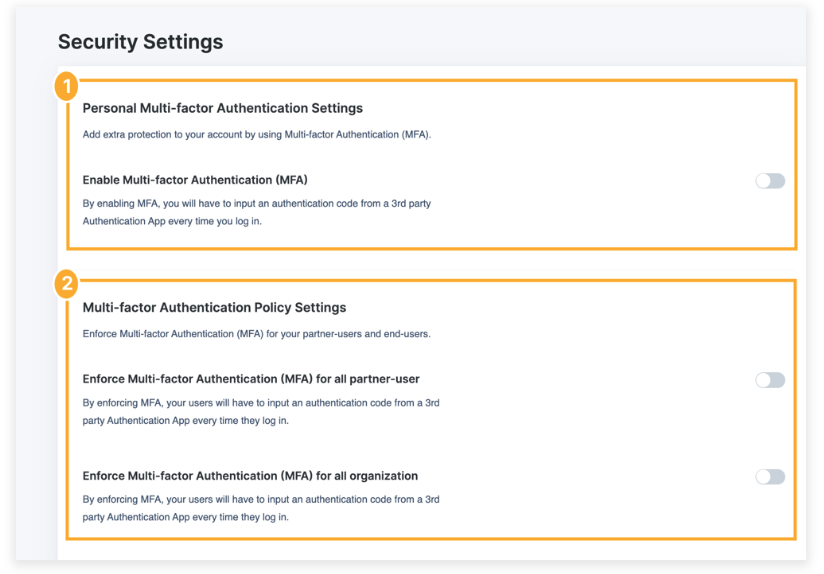
New MFA controls are now available, giving MSP admins new controls to enforce and reset MFA across your organisations.
To enable or manage MFA, navigate to the Security Settings page in NinjaOne SaaS Backup. You can access Security Settings in either of the following ways:
- Log in to the partner portal and navigate to Account → Security Settings.
- Log in to the partner portal and navigate to Settings → Security Settings.
The Security Settings page contains the following two sections:
- Personal Multi-factor Authentication Settings
- Multi-factor Authentication Policy Settings
More information: https://help.dropsuite.com/hc/en-us/articles/20422139475351-18-Multi-Factor-Authentication
2. Deeper Microsoft 365 Tasks Protection
Microsoft 365 Sub-Tasks Backup, Restore, and Download is now available, expanding coverage for task details like folders and categories.
Enable the sub-app permission to get started. If you’ve already reauthorised, it’ll appear automatically. If not, an in-product banner will guide you.
Was this article helpful?
That’s Great!
Thank you for your feedback
Sorry! We couldn't be helpful
Thank you for your feedback
Feedback sent
We appreciate your effort and will try to fix the article